FigJam is an interactive collaborative whiteboard tool designed for teams to brainstorm, plan, and visualize ideas collectively. With its intuitive interface and real-time editing capabilities, it fosters creativity and collaboration among team members. Ideal for remote and hybrid teams, FigJam enhances engagement and productivity during workshops and meetings.
FigJam Review
FigJam is a powerful collaborative whiteboard tool developed by Figma, aimed at enhancing team creativity and engagement through interactive brainstorming sessions. The platform provides a visually stimulating environment where users can sketch ideas, create diagrams, and share feedback in real-time. It's particularly useful for design teams, project managers, and anyone involved in collaborative efforts, making it an essential tool in today's increasingly remote work culture.
Who It's For
FigJam is tailored for teams across various industries that prioritize collaboration and creativity. Whether you're a product designer, marketer, educator, or project manager, this tool is designed to facilitate seamless communication and idea generation. With its user-friendly interface, it’s accessible for both tech-savvy individuals and those less familiar with digital tools, making it a suitable choice for teams of all sizes.
Core Functionality
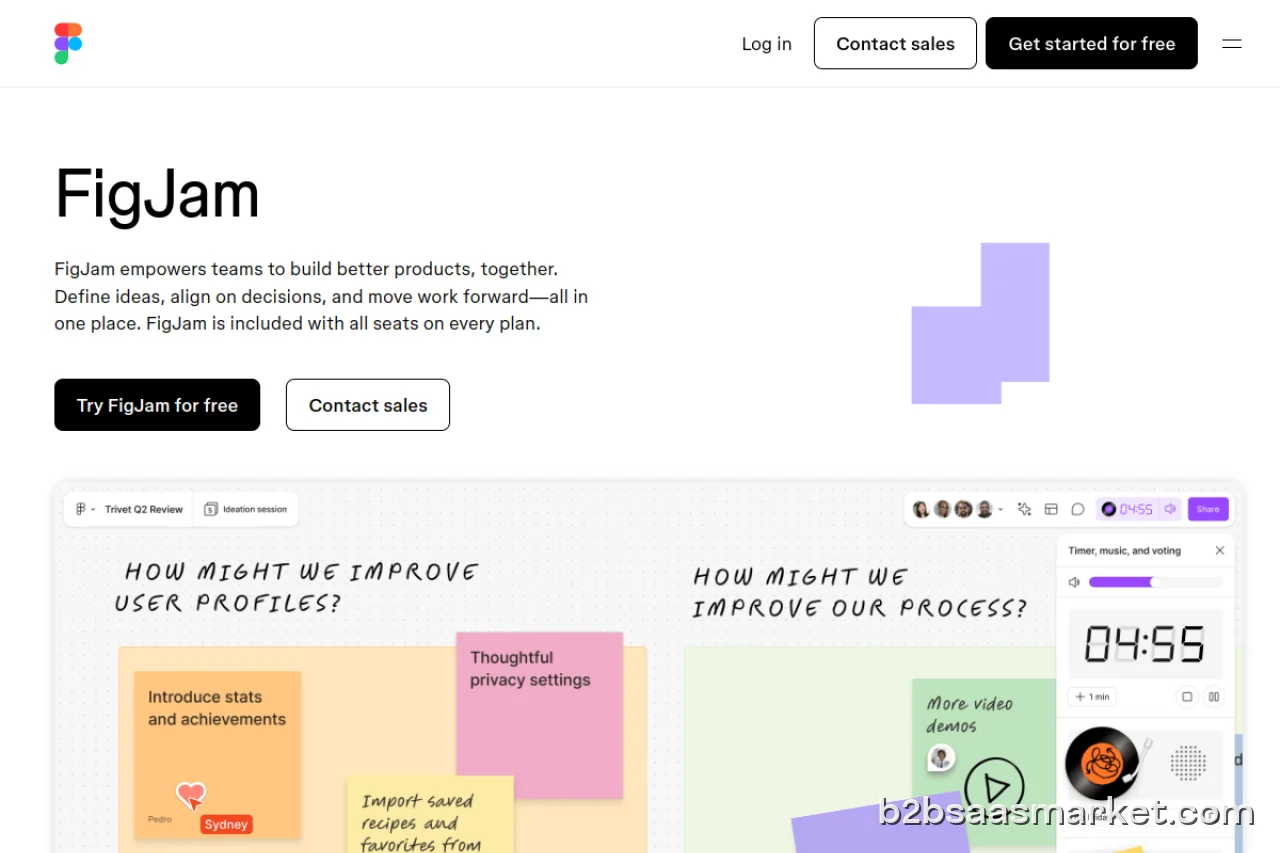
The core functionality of FigJam revolves around its interactive whiteboard features. Users can create sticky notes, draw shapes, and use a range of pre-built templates to kickstart their brainstorming sessions. The platform supports real-time collaboration, allowing multiple users to work on the board simultaneously, which is particularly beneficial for remote teams. Additionally, FigJam integrates seamlessly with Figma, enabling users to transition effortlessly between design and brainstorming phases.
Business Benefits
Utilizing FigJam can lead to significant business benefits, including enhanced team collaboration and improved project outcomes. By providing a centralized space for idea sharing and feedback, teams can reduce misunderstandings and streamline their decision-making processes. The visual nature of FigJam also aids in better idea retention and understanding, which can lead to more innovative solutions. Furthermore, its flexibility allows for diverse use cases, from strategic planning to user experience testing, thus catering to various business needs.
Conclusion/Verdict
In conclusion, FigJam stands out as an excellent tool for teams seeking to boost collaboration and creativity. Its combination of visual elements, real-time collaboration, and integration with Figma makes it a versatile option for businesses looking to enhance their brainstorming sessions. Whether for remote teams or in-person workshops, FigJam can significantly improve how teams generate and develop ideas, making it a worthy investment for any organization focused on innovation and effective teamwork.
Key Features
- Interactive whiteboard with real-time collaboration
- Integration with Figma for design and brainstorming continuity
- Variety of templates to kickstart sessions
- Sticky notes for easy idea capture and organization
- Drawing tools for sketching and diagramming
- Feedback options for collaborative review
- User-friendly drag-and-drop interface
- Customizable boards to suit different project needs
FigJam Use Cases
- Design teams can use FigJam to brainstorm user experience ideas and create wireframes collaboratively.
- Project managers can facilitate planning sessions and ensure all team members contribute their perspectives.
- Educators can engage students in collaborative learning activities, making remote learning more interactive.
- Marketing teams can map out campaign strategies and gather feedback in a visual format.
- Agile teams can conduct sprint planning and retrospectives, enhancing team alignment.
FigJam Pros & Cons
- Real-time collaboration allows multiple users to work simultaneously on the same board, enhancing teamwork.
- User-friendly interface that is accessible to both tech-savvy users and beginners.
- Integrates seamlessly with Figma, creating a smooth transition between design and brainstorming.
- Offers a variety of templates and tools for brainstorming, planning, and visualizing ideas.
- Supports a wide range of use cases, from project planning to educational workshops.
- Encourages creativity and engagement through interactive features like sticky notes and drawing tools.
- Limited offline capabilities, requiring a stable internet connection for effective use.
- Some advanced features may require familiarity with design tools, which could have a learning curve.
- Pricing may become a concern for smaller teams as they scale and require more functionalities.
- The platform may not be as suitable for highly structured tasks that require strict workflows.
Integrations
User Reviews
My daily tool for several years now. It's versatile, convenient for teamwork, and constantly evolving. It's a pleasure to follow the process from the very beginning. There are some questionable decisions, but overall, I really like it.
The website feels so unintuitive. Every time I try to do something specific like move text, or move a shape to a certain position, it is difficult to actually accomplish. It should not be this difficult. I’ve wasted so much time on simple things that should not have been that hard in the first place.
Frequently Asked Questions
FigJam is a collaborative whiteboard tool developed by Figma, designed to facilitate brainstorming, planning, and idea visualization in real-time.
Yes, FigJam allows real-time collaboration, enabling multiple users to work together on the same board at the same time.
Teams in design, marketing, education, and project management can greatly benefit from FigJam's collaborative features, making it easier to brainstorm and visualize ideas.
Yes, FigJam integrates seamlessly with Figma and various other tools, enhancing its functionality and allowing for smoother workflows.
Currently, FigJam is primarily web-based, but its design is optimized for various devices for easy access.
FigJam typically follows a freemium model, allowing users to access basic features for free, with premium features available through paid plans.
FigJam requires an internet connection to collaborate effectively, and its offline capabilities are limited.
Yes, FigJam offers support through various channels, including a knowledge base and community forums.
Quick Info
- Category Collaboration
- Rating 2.7/5
- Free Trial Yes
- Trial Period 14 days
- Deployment Cloud

Community
Mobile Apps
Company Info
- Company Figma
- Founded 2012
- Headquarters San Francisco, United States
- Employees 201-500
 More tools from United States →
Target Audience
FigJam is ideal for creative professionals, project managers, and educators who thrive on collaboration and visual communication. Its ease of use and versatility make it suitable for teams of any size, particularly those working remotely or in hybrid environments.
Platforms